
You browsed a pair of running shoes on a Shopify store this morning.
By lunchtime, you saw an ad on Instagram showing exactly those shoes with your size, the current price, in stock.
That was a Dynamic Product Ad.
Dynamic Product Ads (DPA) are Meta ad campaigns that automatically generate personalised ads by combining your Shopify product catalogue with individual browsing signals.
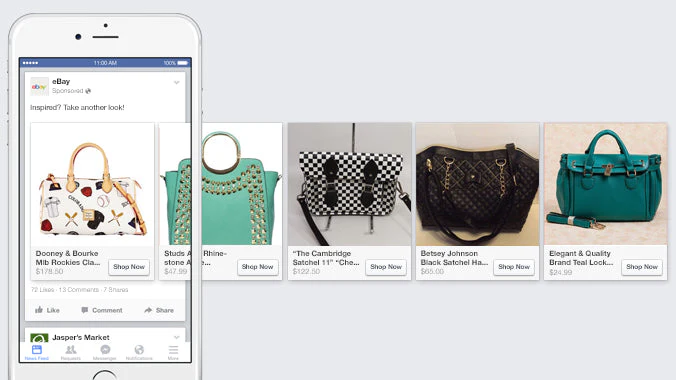
Instead of showing the same ad to everyone, DPA show each visitor the exact product they interacted with. It does it at scale, without creating individual ads for each product.
This guide explains what DPA are, how they work, how they compare to standard ads, and whether your Shopify store should be running them.
⚡ MyAdForce sets up your full DPA structure from your Shopify catalogue in under 10 minutes.
Standard Ads vs DPA in Plain English
- Standard Meta ads work like a billboard: you design one message and show it to a defined audience.
Everyone in that audience sees the same creative. It might be your best-selling product, your brand campaign, or a promotional offer but it’s identical for all viewers.

- Dynamic Product Ads work like a personal shopper. Meta knows which products each visitor looked at on your store.
DPA use that information to show each person an ad featuring the specific product they browsed with your current price, live stock status, and your product image (pulled automatically from your Shopify catalogue).
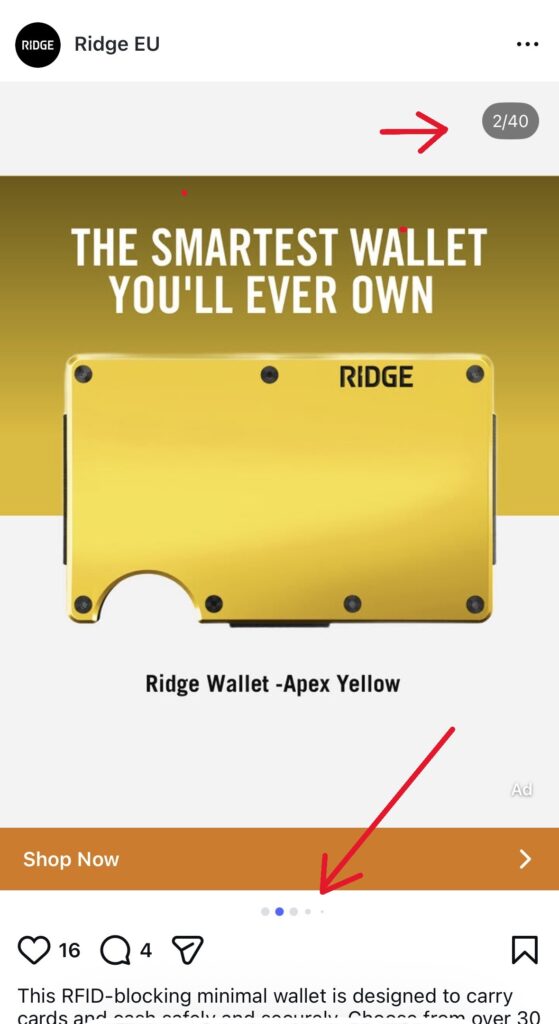
Basically, you build one campaign and products are showed dynamically to previous visitors of your website.
Meta handles the personalisation for every visitor, across every product in your catalogue, simultaneously.
How the Catalogue to Viewer to Ad Chain Works
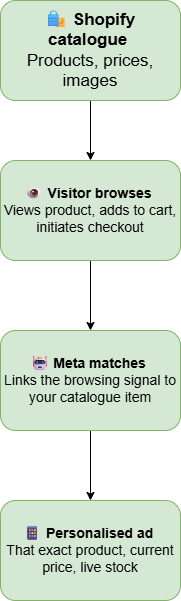
The four steps happen automatically, in real time, for every visitor who lands on your Shopify store:
- Shopify catalogue → Meta: Your product feed (titles, prices, images, availability) syncs to Meta Commerce Manager. Meta holds this as your advertising catalogue.
- Visitor browses: Someone views a product page, adds to cart, or starts checkout. Your Meta Pixel fires and records the event, specifically which product ID they interacted with.
- Meta matches signal to catalogue: Meta’s algorithm links the browsing event to the corresponding item in your catalogue. It knows the visitor looked at product ID X.
- Personalised ad is served: The next time that visitor is on Facebook or Instagram, Meta serves an ad populated with product X. If you’ve added an overlay (price badge, promotional banner), that appears too.
💡 DPA vs Catalogue Ads: You’ll see both terms used as they refer to the same thing. ‘Catalogue Sales’ is the campaign objective in Meta Ads Manager. ‘Dynamic Product Ads’ is the industry term. ‘Catalogue ads’ is a common shorthand. This guide uses them interchangeably.
DPA vs Standard Ads: Side-by-Side
| Dynamic Product Ads | Standard ads | |
|---|---|---|
| Personalisation | Every viewer sees the exact product they browsed | Same creative for the entire audience |
| Creative management | Automated : Meta pulls from catalogue dynamically | Manual : you create each ad individually |
| Scale | One campaign covers 1 or 10,000 products | Each new product needs new assets |
| Price / stock accuracy | Always current (synced from Shopify) | Can show wrong price or sold-out items |
| Cost per purchase | 34% lower than standard ecommerce ads (Meta data) | Higher ; lower relevance = lower CVR |
| Setup effort | One campaign setup, then largely automated | Ongoing creative production per product |
| Best use case | Stores with 10+ products. Always-on retargeting. | New launches. Brand campaigns. Awareness. |
The 34% lower cost per purchase figure comes from Meta’s own published data on catalogue ad performance vs standard ecommerce ads.
The personalisation effect is the driver : an ad showing the exact product someone already looked at converts at a fundamentally higher rate than a generic brand ad shown to the same person.
Who Should Use Dynamic Product Ads (DPA)?
DPA are not for every Shopify store at every stage. Here’s the honest breakdown:
Should your store be running DPA?
✅ Yes! If you have 10+ products: DPA scale with catalogue size.
The more products, the more personalisation is possible, and the more DPA outperform standard ads. A 200-product catalogue running DPA will almost always outperform a 200-product catalogue running only standard ads.
✅ Yes! If you have consistent traffic:
DPA need browsing signals to personalise.
If you’re getting 50+ daily product page views, DPA retargeting will have a meaningful audience to work with. Below 50 daily views, the audience is too small to generate useful signals.
⚠️ Maybe if you have under 10 products:
DPA still work with small catalogues but the personalisation advantage is minimal. Standard retargeting campaigns with product-specific creatives may perform comparably with less setup effort.
❌ Not yet if you have no Pixel data: DPA retargeting needs browsing history stored in your Pixel.
A brand new store with zero Pixel events has no audience to retarget. Set up your Pixel first, drive traffic for 2–4 weeks, then launch DPA.
What You Need Before Running DPA
✅ DPA prerequisites use this checlist before you start :
- ☐ Meta Business Manager account (not a personal ad account)
- ☐ Meta Pixel installed on your Shopify store
- ☐ Conversions API (CAPI) is active (verify in Events Manager )
- ☐ Shopify store connected to Meta Commerce Manager via Facebook & Instagram sales channel
- ☐ At least 10 active products in your Shopify catalogue
- ☐ Product images meeting spec: minimum 1080×1080px, no text covering >20% of image
- ☐ Commerce Manager Diagnostics: zero disapproved items
If any of these are missing, DPA will either not run or underperform significantly.
The most common blocker is the Conversions API. Many Shopify merchants have the Pixel installed but skip CAPI, which means Meta is missing 30–40% of conversion signals post-iOS 14.
Next Step: Set Up Your First DPA Campaign
Understanding what DPA are is the first step!
Setting them up correctly with the right campaign structure, the right audiences, and a product feed that actually powers good personalisation is where most merchants get stuck.
The full setup process covers three campaign types: broad DPA (prospecting new buyers), retargeting DPA (re-engaging visitors), and upsell DPA (past buyers). Each targets a different stage of the buyer journey and should have its own budget allocation.
⚡ MyAdForce builds your complete DPA structure (prospecting, retargeting, upsell) directly from your Shopify catalogue.
No manual configuration.
→ Campaign structure: Dynamic Product Ads for Shopify
→ Feed requirements: Shopify Product Feed for Meta Ads
Leave a Reply